Your first agent
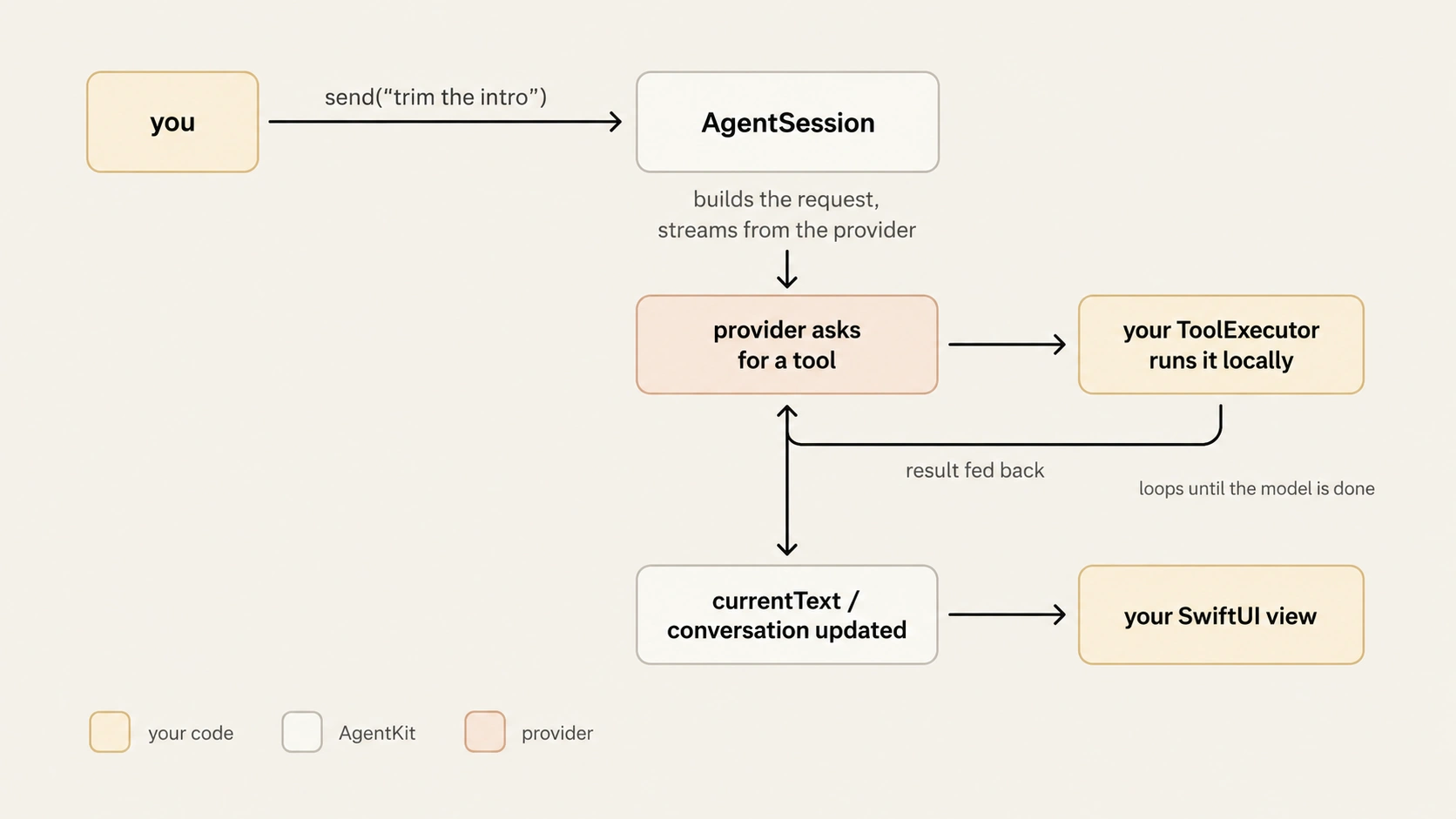
AgentKit separates inference from execution. The provider decides what to do; your app decides how. You write tool domains and a persona; AgentKit owns the loop.
A turn flows like this:
Step 1 — Define a tool domain
A domain groups related tools behind one executor and declares its
capabilities. Each tool has a domain-qualified id (domain.tool_name), a
description the model reads, and a schema for its parameters.
struct TimelineDomain: ToolDomain {
    let manifest = DomainManifest(
        id: "timeline",
        version: "1.0",
        capabilities: [.mutating],
        summary: "Inspect and edit the video timeline"
    )

    let tools: [ToolDefinition] = [
        ToolDefinition(
            id: "timeline.list_clips",
            description: "List the clips currently on the timeline.",
            parameters: .object(properties: [:], required: [])
        ),
        ToolDefinition(
            id: "timeline.trim_clip",
            description: "Trim a clip to a new end time, in seconds.",
            parameters: .object(
                properties: [
                    "clip_id": ToolSchemaProperty(schema: .string(), description: "Clip identifier"),
                    "end":     ToolSchemaProperty(schema: .number,    description: "New end time (seconds)"),
                ],
                required: ["clip_id", "end"]
            )
        ),
    ]

    let executor: any ToolExecutor

    init(timeline: TimelineStore) {
        self.executor = TimelineExecutor(timeline: timeline)
    }
}
TimelineStore stands in for whatever owns your app's state — the executor
holds it and runs every call against it.
Capabilities are honest declarations — .readOnly, .mutating,
.networking, .paid, .destructive. Guards and confirmation policies read
them, so a domain that charges money or deletes data should say so. For schema
design and multi-tool executors, see define tool domains.
Step 2 — Implement the executor
The executor is the one method the model can reach into. It receives a
ToolCall and returns a ToolOutcome — failures are values, not thrown
errors, so the model can see and react to them.
struct TimelineExecutor: ToolExecutor {
    let timeline: TimelineStore

    func execute(_ call: ToolCall, revision: UInt64?) async throws -> ToolOutcome {
        switch call.name {
        case "timeline.list_clips":
            let clips = await timeline.clips()
            return .success(ToolResultPayload(
                content: [.json(.array(clips.map { .string($0.id) }))]
            ))

        case "timeline.trim_clip":
            guard let clip = call.arguments["clip_id"]?.stringValue,
                  let end  = call.arguments["end"]?.doubleValue else {
                return .failed(ToolErrorPayload(message: "missing clip_id or end"))
            }
            do {
                try await timeline.trim(clip, to: end)
                return .success(ToolResultPayload(
                    content: [.text("Trimmed \(clip) to \(end)s")],
                    affectedEntities: [EntityRef(domain: "timeline", id: clip)]
                ))
            } catch {
                return .failed(ToolErrorPayload(message: "trim failed: \(error)", isRetryable: true))
            }

        default:
            return .failed(ToolErrorPayload(message: "unknown tool \(call.name)"))
        }
    }
}
Before your executor runs, AgentKit validates the call's arguments against the
tool's declared schema. If they do not match (a missing required field, a wrong
type, an undeclared property under a closed schema), the mismatch is fed back to
the model to correct, up to AgentRunLimits.maxToolArgumentRepairs times
(default 1); if it still does not match, the turn throws a typed
ToolArgumentRepairExhausted. So execute is reached only after the arguments
pass validation, and it receives the model's original arguments unchanged (a
no-argument call can arrive as .null), so read them with the typed accessors
below, which return nil for an absent field instead of trapping.
Read arguments with the typed accessors on JSONValue — .stringValue,
.intValue, .doubleValue, .boolValue, .arrayValue, .objectValue, or
subscript(key:).
ToolOutcome has four cases, each meaningful to the loop:
.success(ToolResultPayload)— the result is fed back to the model..denied(reason:)— the call was refused; the model sees the reason..failed(ToolErrorPayload)— execution errored; the model sees the message and can adapt. SetisRetryableand the model is told the failure is retryable, so it can decide whether to try the call again..conflict(ConflictPayload)— optimistic-concurrency conflict; see undo every turn.
Step 3 — Create the runtime and agent
Register your domains with a runtime, then build a session. Everything past
role is defaulted.
@MainActor
func makeTimelineAgent(timeline: TimelineStore) throws -> AgentSession {
    let runtime = AgentKitRuntime()
    try runtime.register(TimelineDomain(timeline: timeline))

    return try runtime.makeAgent(
        provider: .anthropic(apiKey: key),
        role: AgentRole(staticPersona: "You are a precise video-editing assistant."),
        domains: .only(["timeline"])
    )
}
AgentRole is your system prompt. Its second parameter, dynamicDirectives,
is an async closure evaluated each turn — use it for live state the model
should always know:
AgentRole(
    staticPersona: "You are a precise video-editing assistant.",
    dynamicDirectives: { "The user currently has clip \(await selection.id) selected." }
)
Step 4 — Pick the model
This is the one line you change per deployment.
.anthropic(apiKey: "sk-ant-…", model: "claude-sonnet-4-6")   // prototyping
.openAI(apiKey: "sk-…",        model: "gpt-4o")
.gemini(apiKey: "AIza…",       model: "gemini-2.5-flash")
.appleFoundationModels()                                      // on-device, no key
Direct providers send the key from the device — fine for prototypes, not for shipping client apps. For production, name an agent profile instead of a key.
Step 5 — Drive the agent
let agent = try makeTimelineAgent(timeline: timeline)
try await agent.send("Trim the intro clip to five seconds")
print(agent.currentText)
send(_:) runs the whole loop — request, tool calls, results, follow-ups —
and appends the assistant's reply to conversation. The observable surface:
| Property | Use |
|---|---|
currentText |
the streaming assistant text |
isRunning |
a turn is in flight |
conversation |
full message history |
activeToolCalls |
tools currently executing |
pendingConfirmation |
a call is waiting for the user |
lastUsageReport |
token usage from the last turn |
lastSchemaWarnings |
non-fatal tool-schema issues |
lastContextDiagnostics |
context-source errors |
Step 6 — Bind to SwiftUI
AgentSession is @Observable, so the view updates as text streams and
confirmations arrive:
struct ChatView: View {
    @State var agent: AgentSession
    @State var input = ""
    @State var sendError: Error?

    var body: some View {
        VStack {
            ScrollView { Text(agent.currentText) }

            if let sendError {
                Text(String(describing: sendError)).foregroundStyle(.red)
            }

            if agent.isRunning { ProgressView("Thinking…") }

            if let pending = agent.pendingConfirmation {
                VStack {
                    Text(pending.reason)
                    HStack {
                        Button("Allow") { agent.respondToConfirmation(true) }
                        Button("Deny")  { agent.respondToConfirmation(false) }
                    }
                }
            }

            HStack {
                TextField("Message", text: $input)
                Button("Send") {
                    let text = input; input = ""
                    Task {
                        do { try await agent.send(text) }
                        catch { sendError = error }
                    }
                }
                .disabled(agent.isRunning)
            }
        }
    }
}
send() throws on auth, network, and limit failures — never drop them on the
floor. See when it fails.
Next
- Guard the dangerous calls — confirm or deny before a tool runs.
- Undo every turn — one transaction per turn.
- Go to production — keys out of the app.