How a turn works
One call to send(_:) is one turn. The session builds a request from your
persona, live context, and the conversation so far; streams the model's
response; runs any tool calls through your executor; and feeds the results
back until the model answers in plain text. You never drive the loop — you
observe it.
The loop
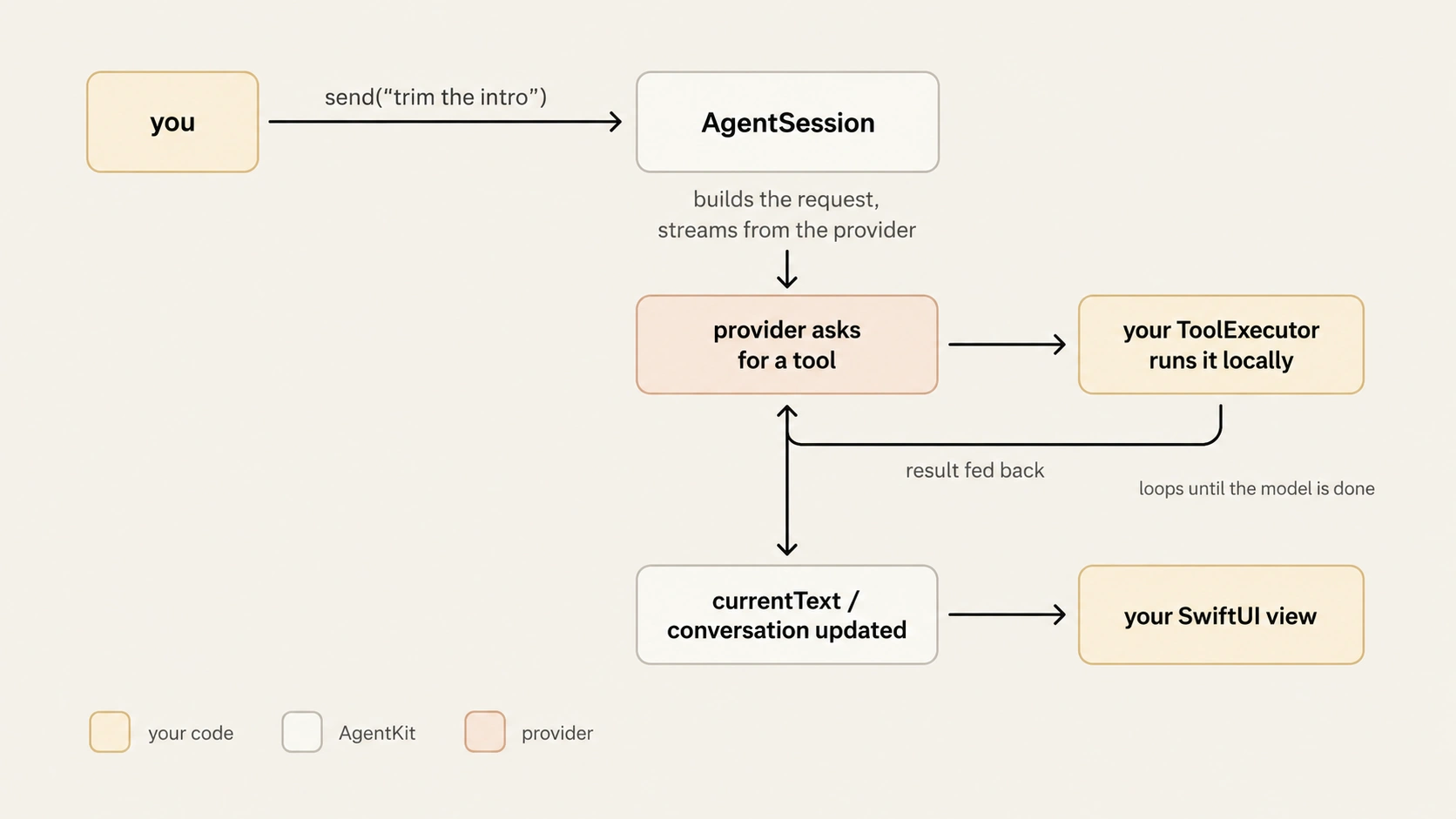
Each turn, the session:
- Validates the active tool schemas with the provider — warnings land in
lastSchemaWarnings, they never abort the turn. - Appends your text to
conversationas a user message. - Builds the request: the
AgentRolepersona and directives, context-source summaries, message history, and tool definitions. - Streams the response. Text deltas accumulate in
currentText. - Runs each requested tool through your executor and feeds the outcome back in a follow-up request.
- Stops when the model responds without tool calls.
A turn can take several provider round trips — one per batch of tool calls — and run limits bound all of it. With the on-device provider the model runs tools inside its own session rather than through follow-up requests, but the surface below and the cancellation contract are identical (see on-device with Apple).
Watch the state
AgentSession is @Observable; the quickstart lists what
each property is for. What matters here is when each one changes:
| Property | During the turn | When the turn ends |
|---|---|---|
isRunning |
true |
false — on success, failure, or cancel |
currentText |
accumulates streamed text from empty | keeps the final (or partial) text until the next turn resets it |
conversation |
grows as messages append | the durable record — see conversations |
activeToolCalls |
the calls executing right now | cleared |
pendingConfirmation |
set while a call waits on the user | cleared |
lastUsageReport |
reset at the start, then set on each provider usage event | this turn's report, or nil if it emitted none — reset next turn |
lastSchemaWarnings |
set after tool validation | kept until the next turn |
lastContextDiagnostics |
set as context sources refresh | kept until the next turn |
Thrown, or fed back
Failures travel on two channels, and the split is deliberate:
send()throws session-level failures. Provider and network errors, run limits, cancellation, misconfiguration. The turn ends, the turn's undo transaction rolls back, already-appended history stays (your message, plus any completed tool exchanges), and nothing is appended after the failure. The catalog lives in when it fails.- Tool problems are outcomes the model sees. A failed executor, a guard
denial, a declined confirmation, a conflict, even a hallucinated tool name —
each becomes a tool result fed back to the model so it can react. The turn
keeps going and
send()does not throw.
Cancel a turn
cancel() requests cooperative cancellation. It takes effect at the next
checkpoint — between stream events, between tool calls, or after the stream
drains. Cancelling the Task that runs send() works too, and ends a stalled
stream immediately. One nuance around confirmation: cancel() denies a
built-in confirmation prompt right away. A custom ConfirmationHandler already
awaiting your decision is not interrupted (it runs to completion or its
timeout), but its approval no longer runs the call: a cancellation checkpoint
sits between the approval and the executor, so a cancel() during confirmation
vetoes the call. The executor never runs, send() throws, and the turn's
conversation is restored to the user message. To also interrupt an in-flight
handler, cancel the Task that runs send().
let sendTask = Task { try await agent.send(prompt) }

// later — the user taps stop:
agent.cancel()       // cooperative: stops at the next checkpoint
sendTask.cancel()    // immediate: ends even a stalled stream
A cancelled turn keeps one contract:
send()throwsAgentSessionError.cancelled.- Tool side-effects roll back through the turn's undo transaction.
- The partial streamed text stays in
currentText— your UI keeps what the user watched arrive. - No assistant message is appended to
conversation; the user message remains.
A cancel that lands after the turn already completed does nothing — the next
send starts clean on the same session.
One transaction per turn
Every turn opens one undo transaction. Tools record entries as they mutate state; the transaction commits when the turn succeeds and rolls back when it throws — including cancellation, as pinned above. How to provide one and what conflicts do to it: undo every turn.